

Hello, this is Fintag. Let's start today with another story about company finances.
You have probably uploaded last month's closing data to an AI and asked, "Summarize why SG&A expenses went up this quarter." And you have probably also had the answer pull a number from the wrong row or misread the unit, so that a person had to check everything again and the whole thing took longer. In many cases the AI did not fail to read the data. Our data was simply built for human eyes only.
In this post, we look at how the rules for writing reports are changing in the public sector and in companies, check with experimental figures how much difference AI-friendly documents actually make, and lay out five rules for making company financial data readable by AI, along with how Fintag handles data.
The rules for writing reports are changing
According to a Seoul Shinmun report on October 20, major companies are changing their internal report templates into formats that AI can easily read and analyze. These are documents in which key information, data and sources are separated item by item and built mostly from plain text. Markdown, which separates headings, lists and links with simple symbols such as the hash (#) or asterisk (*), is the leading example.
The public sector moved first. The Ministry of the Interior and Safety, which had piloted AI-friendly report writing since March, put it into full effect on August 24 and extended it to reports from directors-general and office heads. The core rules are to put a title and number above every table and figure, reduce merged cells, write in full sentences instead of bullet fragments, standardize list symbols and drop unnecessary decoration. According to the ministry, the pilot cut the time spent formatting reports and improved the accuracy of AI summaries and presentation drafts. The Seoul Metropolitan Government issued guidelines for AI-readable official documents in January, and since August the National Health Insurance Service has given all employees a self-check tool that reviews any document on five items: numbering, tables, figures, sentences and terminology.
In the same report, Yoon Seok-bin, a research professor at Sogang University's Graduate School of AI Software Convergence, said that in workplaces with a lot of specialized data, AI works far more efficiently with Markdown reports than with PDFs, and that not only large companies but also small and medium-sized businesses are reshaping their own work culture to be AI-friendly.
From 49.3% to 89.3%: the difference an experiment showed
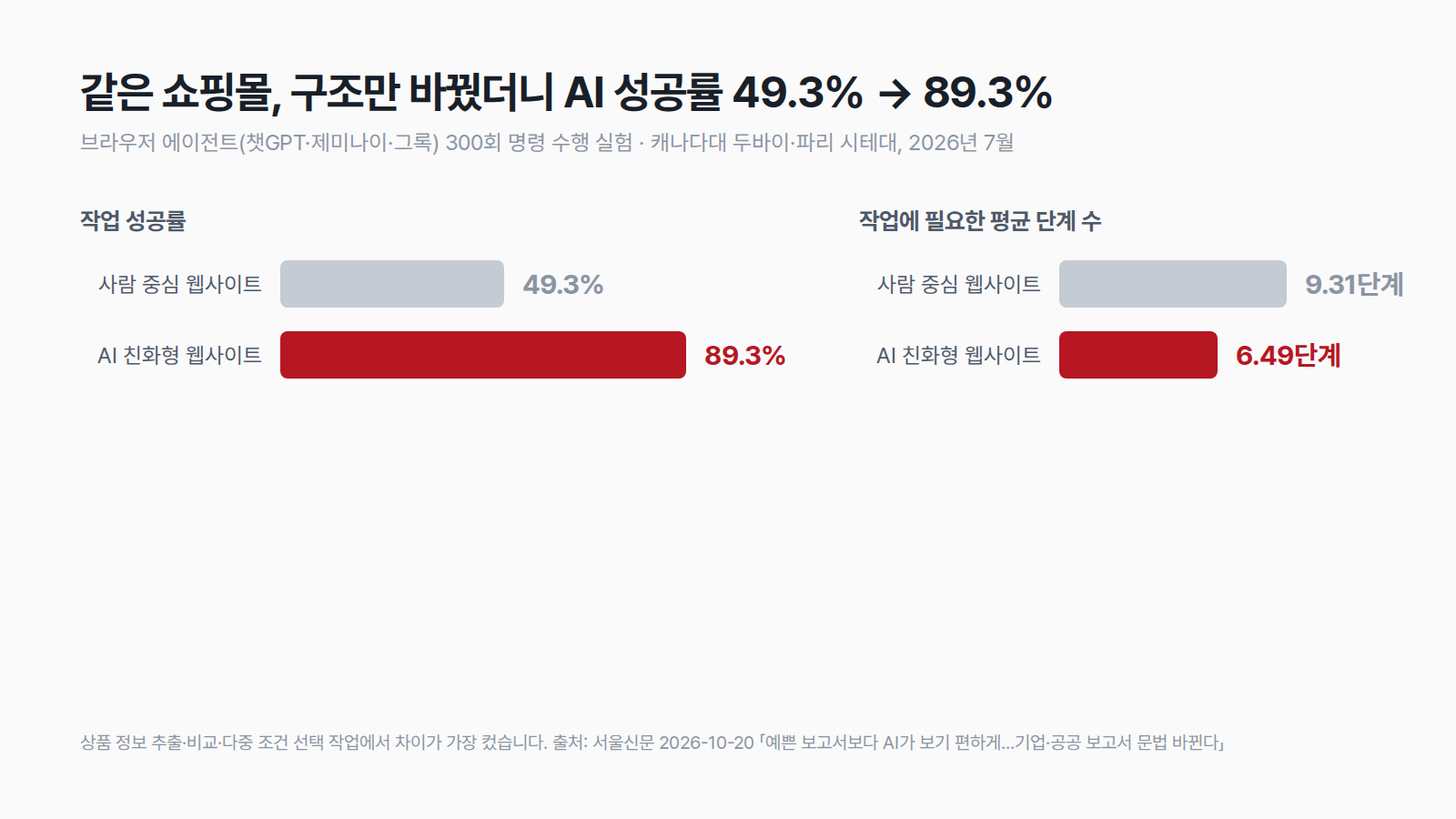
How much does changing the document change the result? A study on "AI agent-friendly website design," released in July by researchers at the University of Canada Dubai and Université Paris Cité, gives an answer. The researchers built the same online store in two versions, a regular human-centered website and an AI-friendly one, and had browser agents such as ChatGPT, Gemini and Grok carry out a total of 300 commands.
The results were clear. The task success rate on the AI-friendly website was 89.3%, 40 percentage points higher than the 49.3% on the human-centered website. The gap was especially large in tasks such as extracting product information, comparing several products and choosing a product while weighing several conditions at once. The average number of steps needed per task also fell from 9.31 to 6.49.
Let's translate these numbers into company work. Suppose a finance manager asks an AI 20 questions a month about closing data. With human-centered data, about half of them, roughly 10, would need to be double-checked or asked again, but with structured data that drops to about 2. If each follow-up takes 10 minutes, the file format alone makes a difference of 80 minutes a month, or 16 hours a year. The shopping experiment cannot be applied as is, but the direction is the same.
Why PDFs and screenshots are hard for AI
For people, a PDF is convenient because it looks the same wherever it is opened. For AI, however, a PDF is closer to a picture that only holds the positions of characters. Where a table's rows and columns end, or which column a header spans, is not stored as structure inside the file, so the reader has to guess again from character coordinates. This is where a client name split across two lines, or a right-aligned amount, ends up being read as part of the neighboring column.
A screenshot adds one more step. Because the table structure can only be guessed after character recognition, errors pile up. By contrast, files that store values cell by cell, such as Excel or CSV, and text that separates headings and tables with symbols, such as Markdown, carry their structure through intact. This is also why the ministry provided its press releases in Markdown alongside the regular version during the pilot. Even with the same content, the format you hand over determines how accurate the answer is.
Five places where AI often gets financial data wrong
If we adapt the ministry's rules and the National Health Insurance Service's check items to company financial data, they come down to five points. Each one looks good to people but is a trap for AI.
- Tables without a title or unit — If a table does not say whether "Revenue 1,250" is in millions of won or thousands of won, the AI guesses. Write the period and unit above the table, such as "Monthly revenue, Q3 2026 (unit: KRW million)."
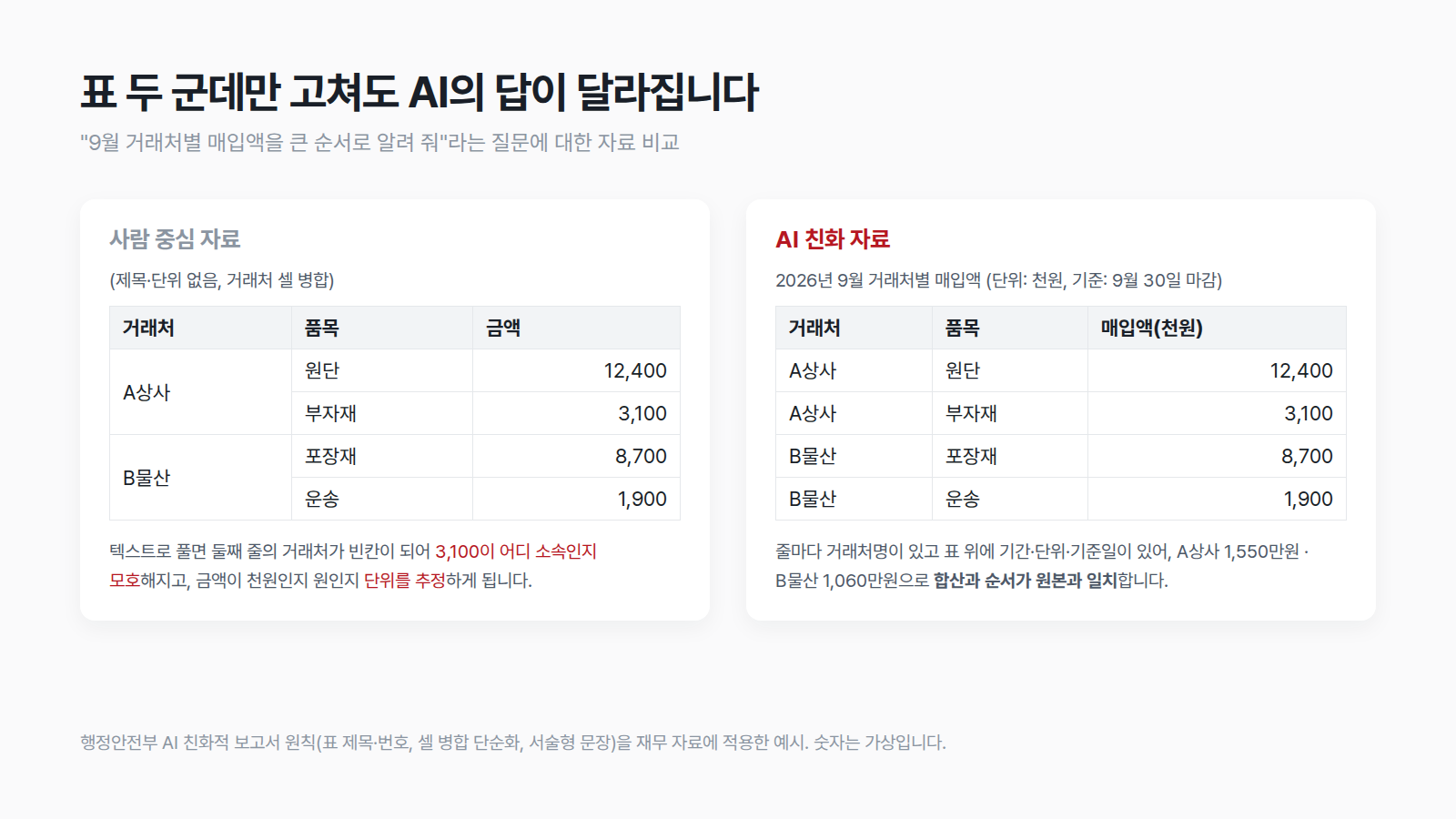
- Merged cells — When a table with client names merged vertically is converted to text, the name remains only on the first row and the rest become blank. The AI easily reads the numbers under the blanks as belonging to a different client. Unmerge the cells and fill in the value on every row.
- Images instead of numbers — A captured chart or a scanned tax invoice goes through one more round of character recognition. If you have the original numbers, include them as a table as well.
- Several topics in one file — When a closing summary, a client list and notes are mixed on one sheet, the AI also reads parts unrelated to the question and the answer gets blurry. The rule is one topic per file.
- Numbers without a source or date — If "balance 300 million" has no reference date, the AI treats it as the latest value. Attach the reference date and source (bank inquiry, financial statements, estimate).
For example, consider the question "List September purchases by supplier, largest first." In a table where supplier names are merged and no unit is given, amounts from the second row onward may be added to the first supplier, or thousands of won may be read as won, giving an answer that is off by a factor of 1,000. If you fill in the supplier name on every row, write "unit: KRW thousand" and ask again, the order and amounts in the answer match the original. Only two things were fixed, yet the result is completely different.
If you are used to bullet-style reports, full sentences may feel unfamiliar. But "Q3 revenue rose 4% from the previous quarter and cost of sales fell 2%, so operating profit stayed at a similar level" is much safer for AI than "Revenue ↑, cost ↓, profit flat." Arrows and abbreviations are shorthand agreed between people, so AI sometimes loses the context.

How Fintag handles data
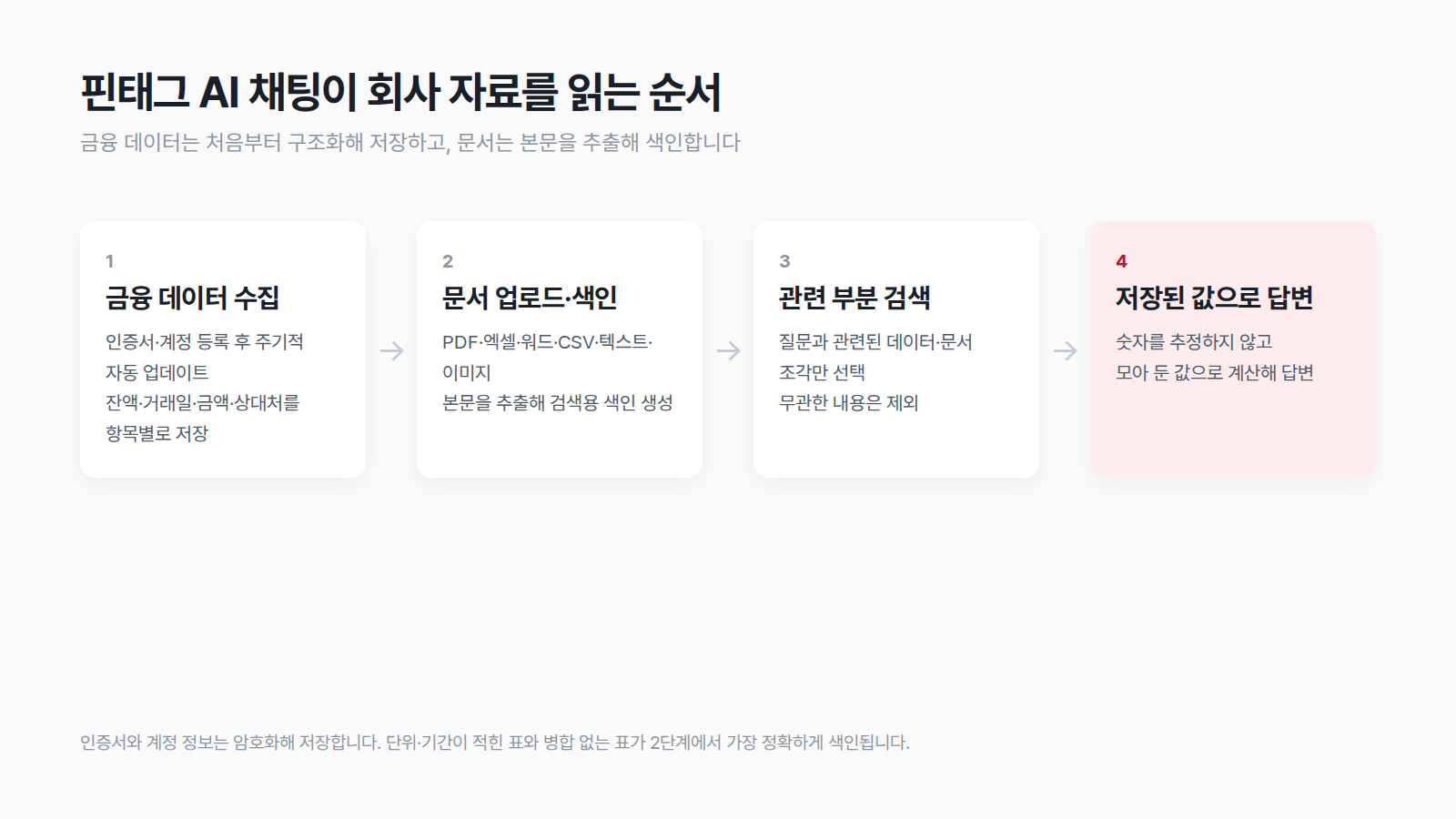
Fintag's AI chat was designed from the start to avoid this problem. Once you register a digital certificate or a financial institution account, account, card, loan and deposit data is updated automatically on a regular basis, and it is stored as structured data with balance, transaction date, amount and counterparty separated item by item. It is not a PDF statement made for people to look at, but a table format that AI reads easily. So when you ask for "last month's total card payments" or "this quarter's interest expense," it answers from the stored values instead of estimating the numbers.
Your company's own documents are used as well. When you upload PDF, Excel, Word, CSV, text or image files, Fintag extracts the text, builds a search index and reflects only the parts relevant to your question in the answer. The five rules above apply directly here. Tables with a stated unit and period are found accurately, and for tables with many merged cells, the answer quality is better if a person tidies them once before uploading. Certificates and account credentials are stored encrypted.
How to apply this from your next closing
There is no need to change every document at once. Start with the data you ask AI about most often and work through it in order.
- Pick three files you ask about most often. Files that draw repeated questions come first, such as the monthly closing summary, revenue and purchases by client, and the loan status.
- Write a title, period and unit above every table. This takes the least effort for the biggest effect.
- Unmerge cells and make one row per item. In Excel, unmerge the cells and fill the blanks with the value above, and you are done.
- Ask the same question of the before and after versions. Checking for yourself whether the answer changed and whether follow-up questions dropped shows you which file to fix next.
- Hand recurring data over to automatic collection. If statements you receive every month from banks and card issuers come in already structured without anyone copying them over, there are fewer documents to fix in the first place.
| Check item | Human-centered data | AI-friendly data |
|---|---|---|
| Table title and unit | Missing from the header | Period and unit stated above the table |
| Merged cells | Merged for looks | No merging, a value on every row |
| Number format | Screenshot or scanned image | Table of original numbers |
| Reference date and source | Omitted | Reference date and source stated |
📌 Before you ask AI, gather your company's financial data in a form AI can read easily. Fintag automatically updates accounts, cards, loans and deposits across multiple banks and card issuers as structured data, and finds answers right away in AI chat together with your company documents. Ask questions without scattered files with a 2-week free trial. → app.fintag.kr
Thank you. From Fintag.